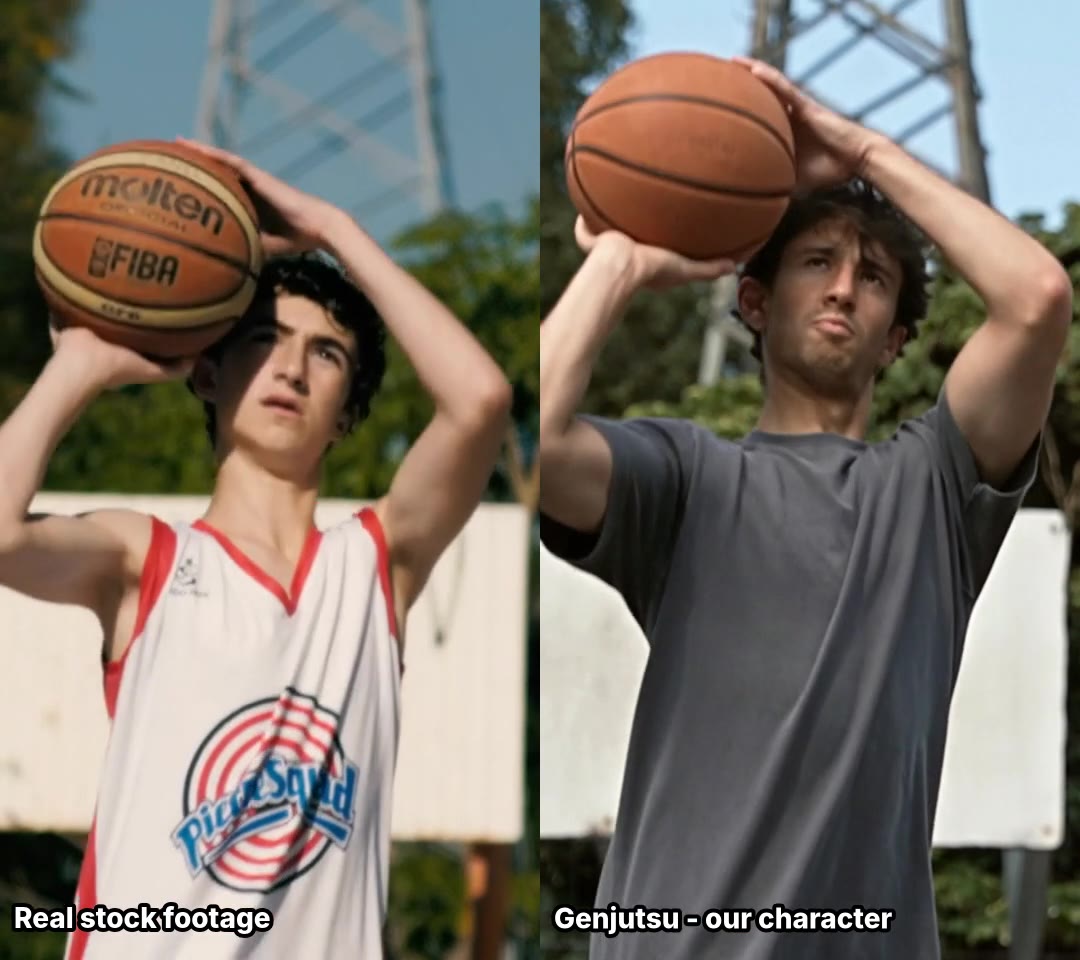
I spent a week and a little over forty dollars asking AI video models to make a man throw a shoe into a bin. Four out of thirteen managed it. Later, when one of the best ones got a bin with a closed lid, it simply made the lid disappear. What finally worked was not generating the throw at all.
First, a disclaimer. I’m not a graphics or video person. I can’t edit in Premiere, and I’d have to look up what a LUT is. My eye for “this looks off” is about as good as anyone’s scrolling TikTok on the bus. In this case that’s not the worst qualification, because that’s exactly the audience these videos are for.
The idea came from busypipe, the TikTok analytics tool I’m building. It shows brands what works in their niche: formats, hooks, rising hashtags. Looking at that kind of data, the next question is obvious: “fine, now make me one”. Whether that ever belongs in busypipe is an open question. Before thinking about it at all, I wanted to know three things: is the generation good enough, what does it really cost, and how do I even compare models when I don’t trust my own taste.
Most of this post is about the last one.
Same input for every model
This is the one decision I’d keep if I started over. Every model gets the same still image and the same prompt, at about the same length and the same vertical format. No tuning per model, no picking the best of several tries. Otherwise I’d be comparing my luck with prompts, not the models.
I used two shots that test different things:
- Shot A, the shoe toss. A man on an outdoor basketball court throws a white running shoe into a green bin. A person, hands, an object with some weight, and a target.
- Shot B, the product turn. A plain white shoe on wet concrete, a slow turn, water droplets. No people. The question is whether the shoe stays the same shoe while the camera moves.
I ran everything through Higgsfield, because one API key gets you most of the current models. I started with four (Kling 3.0, Seedance 2.0, Hailuo 2.3 and Wan 3.0), then saw the catalogue had more and ran every model that takes a start image: thirteen video models in total, plus a few of their “workflows” for motion transfer, product shots and ad images.
Here is shot A from twelve of them, with the score I gave each (the thirteenth, Cinema Studio 4, failed to generate this one):
And shot B from the same twelve:
These grids turned out to be the most useful thing I made all week. If you watch a dozen clips one after another, you forget the first one by the fifth. If they all play at once, the broken ones stand out within a couple of seconds. The shoe vanishes in mid-air (Kling, both LTX models), flies off towards the hoop (Seedance 2.5), or the video suddenly cuts to a close-up nobody asked for (Happy Horse).
Scoring them myself
My first idea of judging was a checklist, because it sounded objective: did the model do what the prompt said? Does the shoe end up in the bin, yes or no? The first write-up I had, based on contact sheets with a few still frames per clip, said only Hailuo 2.3 got the shoe in. Hailuo was also the cheapest model in the test. So the decision looked easy.
Then I scored every clip myself. I put them all on one page with a score from 1 to 10, a few tick boxes (“usable”, “fake”, “AI glitch”), a notes field, and a tab that ranks everything by score.
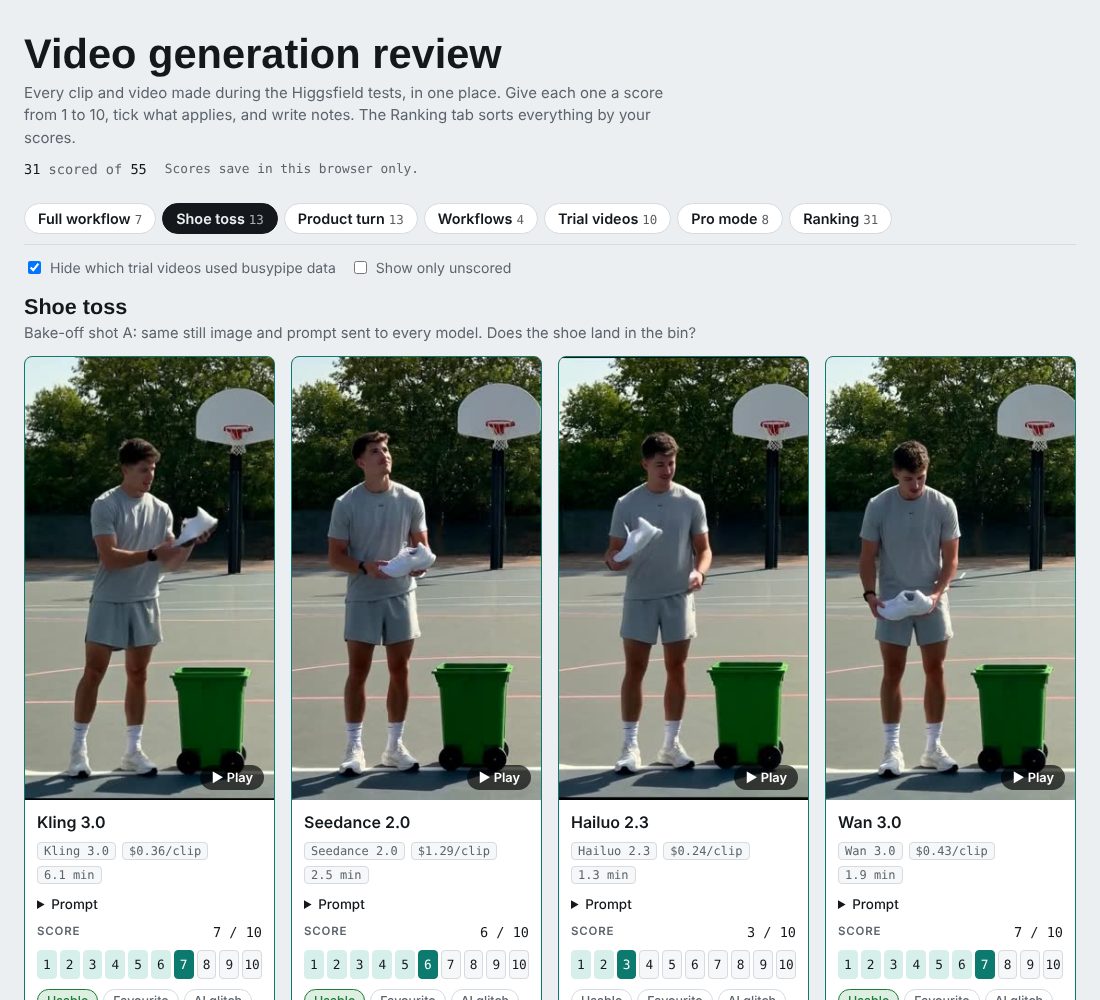
Hailuo got a 3 from me. It does the action, and it looks fake doing it. Grok Video 1.5 got a 9, because the man moves like a real person.
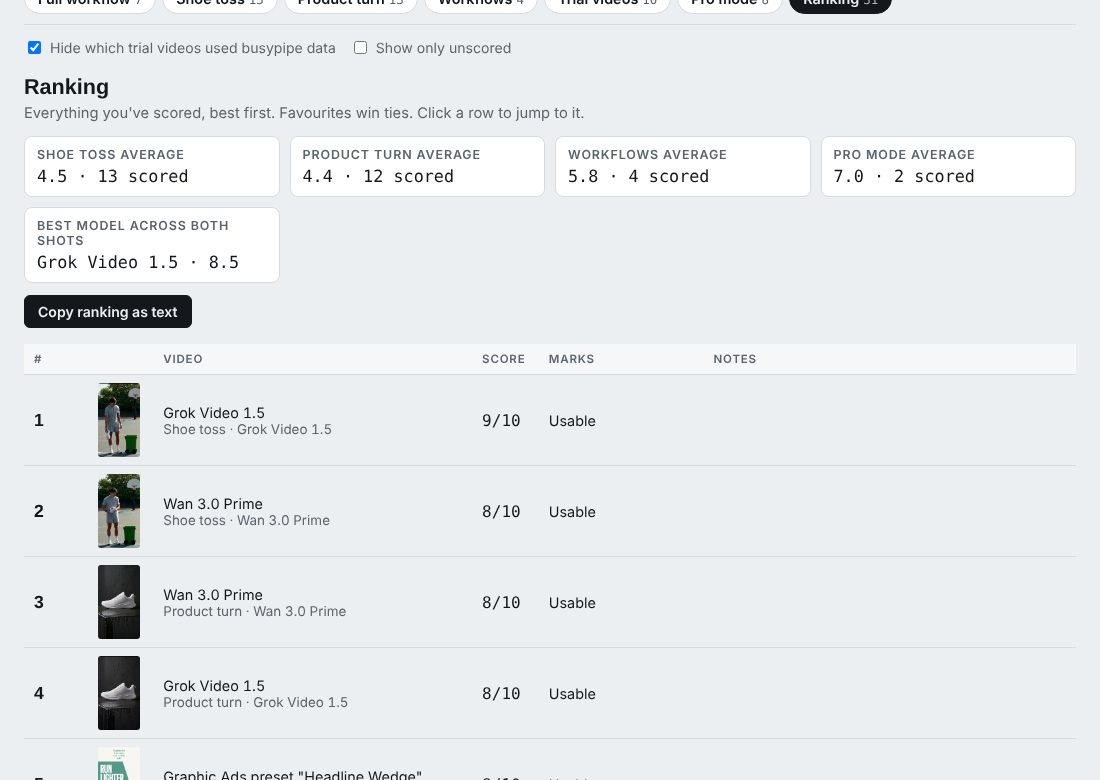
While writing this post I went back through the clips frame by frame, and the first write-up was wrong anyway. Four models get the shoe into the bin, not one: Hailuo, Wan 3.0, Wan 3.0 Prime and Grok. A few stills per clip can’t tell a shoe dropping into a bin from a shoe that disappears. Wan 3.0 Prime even turns the shoe from white to black on the way down. I gave it an 8 anyway, because at normal speed I didn’t notice, and I doubt anyone scrolling would.
So the checklist doesn’t decide anything. Four models pass it, and I scored those four anywhere from 3 to 9. What separates them is whether it looks real. Someone scrolling past has never seen the prompt, but they notice straight away when a hand looks wrong.
Here’s how the main models scored (shoe toss / product turn, then the real cost of one clip):
- Grok Video 1.5: 9 / 8, $0.71
- Wan 3.0 Prime: 8 / 8, $0.60
- Happy Horse 1.1: 7 / 7, $0.60
- Kling 3.0: 7 / 3, $0.36
- Wan 3.0: 7 / 2, $0.43
- Hailuo 2.3: 3 / 6, $0.24
- Seedance 2.0: 6 / 2, $1.29
- Wan 2.7: 1 / 1, $0.43
I marked 11 of the 25 bake-off clips as usable. So in practice a usable five-second clip costs about twice the price of a clip.
What it actually cost
The Higgsfield playground shows a price for each generation. After the run I exported the actual billing and compared. For some models the bill matched. For others it was up to 3.4 times the listed price: Hailuo was listed at $0.07 and billed at $0.24, Seedance 2.0 listed at $0.49 and billed at $1.29. The ranking by value barely moved, but the budget did. My rough estimate for a finished 15-second video, counting retries, is three to ten dollars, not a few cents.
On the positive side, failed and rejected requests didn’t seem to be charged.
Does knowing the niche help?
This was the question I cared about most: does knowing what works for brands like yours make a better video? I made ten short videos. Five came from briefs built on busypipe’s trend data for a group of sportswear brands, like a “does that count?” challenge, a list of gym tips and a 15-minute routine. The other five came from briefs written with no data at all, only “small US running-shoe brand, make five TikToks”. Same models, same editing. I rated them with the source hidden.
It told me nothing about the question. All ten scored 1 or 2, except one generic video that got a 7, and that one had a logo problem. When the footage looks this artificial, you never get as far as judging the idea. Context can improve the idea, but it does nothing for the picture, so I couldn’t test what I cared about until the picture got better.
Trying to make it look better
Higgsfield’s own showcase reel looks nothing like my clips, so I assumed part of the problem was me. I re-ran two of the briefs in what I called “pro mode”: 1080p models, two start images per shot to choose from, and prompts written like a camera brief with lens, framing, light and what must stay still. Below is the second brief, the cheap version next to the pro one:
It is sharper. I still gave the two finished videos a 1 and a 3. The best single shots got 6 and 8, but once you stitch three shots together, one weak shot ruins the whole thing.
Pro mode also showed me a problem I hadn’t thought about. Every prompt asked for plain, unbranded shoes, and said “no logos”. Three of the four running-feet stills came back with real brand marks anyway: a swoosh on a sock, stripes on the shoes, a big swoosh on the side.
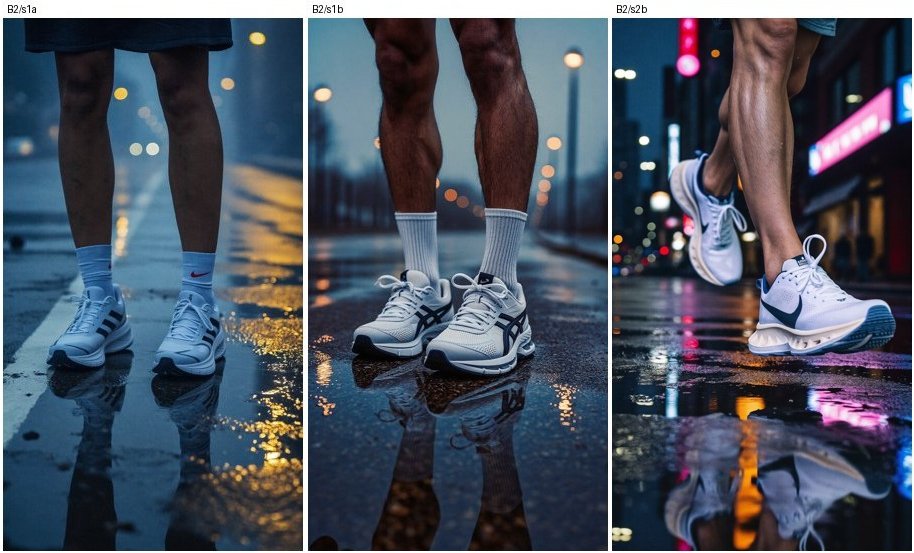
For a product that makes ads for other brands, that’s a real problem. Every frame would need a logo check before it goes anywhere.
Next I read what people who do this professionally recommend. It came down to a few habits. Prompt for a phone look (“shot on a phone”, off-centre, overcast) instead of “cinematic”. Make several takes and keep the cleanest. For actions that keep failing, give the model both the first and the last frame, so it only has to fill in the middle. Afterwards, tone it down a bit: less saturation, some grain, and captions in the style people expect on TikTok.
So I made a new start image that looks more like a phone photo (an overcast, fenced-in lot and a bin with its lid closed), plus an end frame with the shoe already inside the bin. I ran three takes on Wan 3.0 Prime. All three end with the shoe in the bin, but none of them gets there honestly. In two takes the lid is closed, and then the video jumps to a slightly different shot where the lid is already open. At normal speed you barely see that jump, but it feels off. ffmpeg’s scene-change detection finds it in a second, so at least that check is cheap to automate. The third take has no jump, and it’s the one below. Watch the lid.
The shoe hits the closed lid, and in the next frame the lid is gone and the shoe is lying inside. The bin doesn’t open and the shoe doesn’t bounce. The model knew how the clip had to end and drew whatever got it there. I also tried Grok with the same start image and no end frame. He didn’t really throw: in one take he just leans over and puts the shoe on top of the closed lid.
Real footage instead
At this point I gave up on the hard part. I remembered that Higgsfield also has tools that start from an existing video. Real footage already has real physics, so why not start from a real, licensed clip and only replace what has to be ours?
There are two tools for this. One transfers motion: you give it a video and a character, and the character performs the video. The other swaps an object: you give it a video and a product photo. I took two free stock clips from Mixkit, a young man shooting a basketball and someone tying their running shoes, and ran both.
The movement is the same: same lift, aim, release and timing, because it comes from a real person throwing a real ball. Our invented character takes his place, and the jersey with its cartoon-team logo is gone. It’s not a perfect copy. The framing shifts a little, the ball is redrawn without its printed logos, and his hands come down a bit earlier at the end. You only notice when you watch them side by side.
In the second clip the grey sneaker becomes our white knit shoe, and the hands still tie the laces naturally. This was the first result of the week I’d show someone without explaining it first.
It isn’t cheap: roughly $0.58 per second of source video at 720p, so about $6 for a ten-second clip. And the source footage has to be properly licensed, meaning stock, a brand’s own shoots, or clips whose creators agreed to it. Not something scraped from TikTok.
What I’d do differently
- Give every model the same input. Same image, same prompt. Otherwise you’re measuring your own luck.
- Look at everything side by side. The grids and the scoring page told me more than any metric did.
- Score what the audience will notice. “Did it follow the prompt” only tells you which clips are worth looking at. “Does it look real” decides.
- Check frame by frame before writing anything down. A few stills per clip told me one model landed the shoe. Four did.
- Budget from the invoice. The listed prices were up to 3.4 times off.
- Expect single shots to work better than sequences. Every extra generated shot is another chance for something to look fake.
- Check every frame for logos. Writing “no logos” in the prompt doesn’t guarantee anything.
- Don’t generate what real footage already does well. A real clip with a swap beat every generated throw.
Methodology and caveats
- Sample size. One generation per model per shot in the comparison. That’s a direction, not proof. A second run could easily reorder the middle of the list.
- Scoring. All scores are mine, from one viewer who is not a video professional. The context test had a single rater, and the footage was too weak for it to say anything.
- Costs. Per-clip costs come from Higgsfield’s billing export for the model comparison, which was about $20 of the total. Later rounds are estimated from those real per-clip prices. Everything together came to a little over $40. Prices change often.
- Models. The catalogue as of early October 2026. Clips were about five seconds (six for the models that only offer six), vertical 9:16, at the default or 720p resolution unless I say otherwise. Cinema Studio 4 failed on the people shot, so it isn’t in either grid.
- Footage and brands. The brand is a placeholder, and every person in the generated images is invented. The stock clips are Mixkit footage under its free licence. The logos in the image above were added by the model against the prompt, which is why I show it.
- Tools. The scripts, grids and scoring page were put together with an AI assistant doing most of the typing. None of it needed editing software.
Comments